
Progressive Web Apps
What are Progressive Web Apps
Progressive Web Apps are also known as PWA. PWA is an design pattern that use to give native like experience to users using a cross platform web site. It will deliver enhanced capabilities, reliability, and installability while reaching anyone, anywhere, on any device with a single codebase. You can find more details here
How to implement PWA
Make site responsive
To make a progressive web application we have to make sure the web application is supporting cross platform, specially it should work in mobile and desktop. Simply it should be a responsive web application which works on mobile and desktop.
Add a web app manifest
The web app manifest is a JSON file that tells the browser about your Progressive Web App and how it should behave when installed on the user's desktop or mobile device. A typical manifest file includes the app name, the icons the app should use, and the URL that should be opened when the app is launched.
Enable Service worker
A service worker is a script that your browser runs in the background, separate from a web page, opening the door to features that don't need a web page or user interaction.
How to enable PWA in angular applicaiton
The Angular team offers a service worker module with precaching functionality that's well integrated with the framework and the Angular command line interface (CLI).
Adding Service worker
In order to add service worker for angular project, let's install the service-worker package in to our application. Open a console window and enter the following command ng add @angular/pwa --project *project-name* The above command completes the following actions:
Adds the @angular/service-worker package to your project.
Enables service worker build support in the CLI.
Imports and registers the service worker in the app module.
Updates the index.html file:
Includes a link to add the manifest.webmanifest file.
Adds meta tags for theme-color.
Installs icon files to support the installed Progressive Web App (PWA).
Creates the service worker configuration file called ngsw-config.json, which specifies the caching behaviors and other settings.
In order to complete above it will create/modify following files
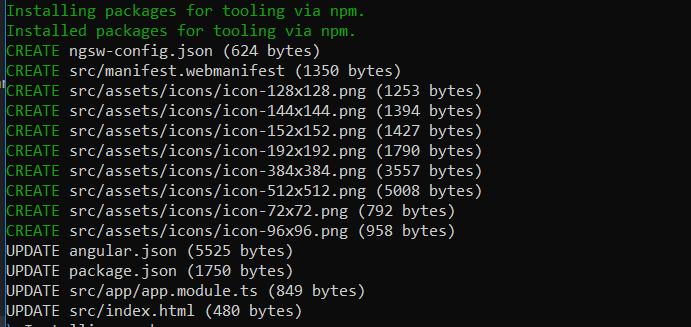
Now we have the initial settings with us and let see how to execute it.
Build the project
Open a console window and enter the following command ng build --prod
Serving the project
Because ng serve does not work with service workers, you must use a separate HTTP server to test your project locally. Also if you not running in localhost, you have to run it in https. To serve the directory containing your web files with http-server, Open a console window and enter the following command http-server -p 8080 -c-1 dist/project-name
Thanks to the Angular team, We are done with the initial pwa with very simple steps. That's all for today and see you soon in another very exiting tutorial