
Server side rendering Overview
What is server side rendering
Rendering will define how the content visible to user. When it comes to web applications, you are accessing it using a web browser. Web browser is capable to understand HTML, JavaScript, CSS, Images and few other stuff. Your browser will get the response as separate content and it will execute and combine the results.If your application use client side code, browser will download the code in to user's device and execute there. If your application use Server side code to generate the HTML, when browser receives the response it just has to render the content. What if we can execute our JavaScript code in server and generate the output HTML. Yes, that is possible and it called Server side rendering
Why Server side rendering
As mentioned earlier, JavaScript application will download the script to users device and execute there. So at the time of initial page load, it doesn't have any content other than the initial HTML. Incase you call http request to get data, it will load the initial page first and then it will execute ajax calls to get the data.
If you check the source of the web page, you will not see the dynamic content there. This has negative impact on,
Search Engines, If you need to crawl your web site by search engines and list your site in search engines, crawler should be able to read the page content. But what crawler can see is more similar to what you see in page source.
Initial page load time, Since the page has to load the initial stuff and then execute the JavaScript and generate dynamic content, it will take some time to render the page content.
When you do Server side rendering, initial response will contains the dynamically generated HTML which your browser can render without further processing. Also search engines can read the content easily.
How to enable server side rendering in angular application
In Order to perform server side rendering, we can execute the JavaScript content using the Node.js. When it comes to Angular, angular has their Angular universal package to support server side rendering
Setting up the angular application
To set up your initial angular application, follow the instructions in Getting started with initial Angular application Now if you run the application and see the page source, you will see that it is an almost empty content and no angular related code there.
Install Angular Universal
In order to enable server side rendering with angular universal, let's install the universal package in to our application. Open a console window and enter the following command ng add @nguniversal/express-engine above command will create/modify following files
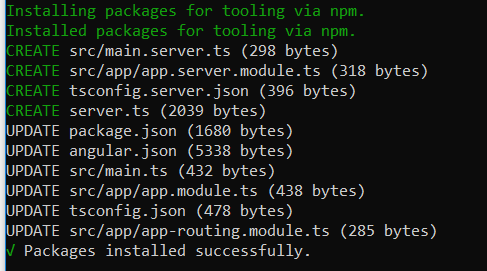
Now we have the initial settings with us and let see how to execute it.
Compile and Serve
Open a console window and enter the following command npm run dev:ssr Now again you can see the page source and you will notice that, angular related content also there. Additionally you can switch off the JavaScript execution from browser and reload the page. you will notice still the page content are loaded.
Thanks to the Angular team, We are done with the initial server side rendering part by very simple steps. That's all for today and see you soon in another very exiting tutorial